Definition
Content Security Policy (CSP) is a feature that helps to prevent or minimize the risk of certain types of security threats
- It consists of a series of instructions from a website to a browser, which instruct the browser to place restrictions on the things that the front-end code is allowed to do
- It basically allows to define and control which resources (such as scripts, styles, and images) can be downloaded and executed
- The primary case for CSP is preventing XSS (cross site scripting) attacks by defining, for example, a limited array of paths that can be used to load a script file (with
script-src) - It can be used also to defend against clickjacking or tabnabbing with
frame-ancestors 'none' - it is a type of cross-domain policies
A CSP can, for example:
- disable inline script tags
- disable dangerous APIs like
eval(),setTimeout(),setInterval()1 - define the permitted sources (script, images, styles and fonts sources2)
- allow only script tags which have the correct id or src value
- disable inline event handlers
- disable javascript: URLs
- defend against CSRH (Client-Side Request Hijacking) attack, with the
connect-srcdirective. It can be used to constrain endpoints for asynchronous requests,EventSourceand WebSockets to trusted domains (see WSH (Web Socket Hijack)), preventing sensitive data exfiltration to other domains (Khodayari, Barber, et al., 2024)
Directives A directive states how the behavior of the browser should be modified on the protected document (Stamm, Sterne, et al., 2010)
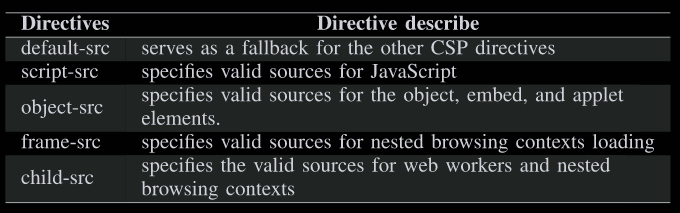
The directive default-src serves as a fallback for the other CSP. If there is no whitelist for other directives, the browser will get resources based on the whitelist of the default-src directive (Lv, Shi, et al., 2023)
Violation report When a CSP violation occurs, the browser sends the report as a JSON object to a specified endpoint via an HTTP POST operation
Example
Content-Security-Policy: default-src 'self'; img-src 'self' example.comIt sets two directives:
default-src= ‘self’: tells the browser to load only src that are same-origin with the document, unless other more specific directives set a different policy for other resource typesimg-src= ‘self’ example.com: tells the browser to load images that are same-origin or that are served from example.com.
Where are the CSP defined?
Server-side, directly in .htaccess or httpd.conf files (for Apache o Nginx machines)
Header set Content-Security-Policy "default-src 'self'; script-src 'self' https://apis.example.com; style-src 'self' 'unsafe-inline';"Backend code (express.js)
const helmet = require('helmet');

app.use(helmet.contentSecurityPolicy({
  directives: {
    defaultSrc: ["'self'"],
    scriptSrc: ["'self'", "https://apis.example.com"],
    styleSrc: ["'self'", "'unsafe-inline'"]
  }
}));
Client-side (not recommended), with the <meta> tag. Useful in some SPA scenario when the application is pure front-end.
<meta http-equiv="Content-Security-Policy" content="default-src 'self'; script-src 'self' https://apis.example.com; style-src 'self' 'unsafe-inline';">Security concerns and challenges
- The implementation of the CSP depends on the needs of the project and must be done manually
- As the project evolves, the CSP must grow in synchrony, otherwise unexpected results may occur
Nonce
With hashes, developers can specify the cryptographic hash of their intended inline scripts in the CSP (Trampert, Stock, et al., 2023)
<script nonce="ABCDEF0123456789"> benignJSFunction () ; </script >The browser then determines for a given script (both inline and external) if the nonce provided in the nonce attribute of the script tag matches with the CSP-specified one.
References
- (Stamm, Sterne, et al., 2010)
- (Tkachenko et al., 2024)
- (Trampert, Stock, et al., 2023)
- (Lv, Shi, et al., 2023)
- https://developer.mozilla.org/en-US/docs/Web/HTTP/Guides/CSP
Footnotes
-
These APIs are dangerous because their first argument is interpreted as code, even if it is a string. So
setInterval(myFunction, 1000)andsetInterval("alert(1)", 1000)will both cause a JS execution ↩ -
Custom fonts may be dangerous. An attacker could define CSS rules to import custom fonts defined in a remote domain. This fonts may hide content or trick the user, or even be exploited for CSS exfiltration as explained by (Heiderich, Niemietz, et al., 2012). To block loading external custom font, use
Content-Security-Policy: font-src 'self'↩